Tuesday, 16 December 2014
The makeup tutorial I followed for my models
I followed the instructions off this makeup tutorial video off you tube, I enjoyed completing this makeup look.

Artists for contents page
These are the following artists in which I am going to include on my contents page:
1) Disclosure
2) Shift K3Y
3) Rudimental
I have chosen these three dance artists because I personally enjoy their music therefor I will have plenty of things to write about each of the artists.
1) Disclosure
2) Shift K3Y
3) Rudimental
 | ||
Disclosure
|

 |
| Rudimental |
Monday, 8 December 2014
My weekly plan week thirteen
This week I intend to complete the following:
1) Music magazine covers voice thread analysis (dance genre)
2) Artists for contents page
3) The makeup tutorial (followed for my models)
4) Edited images for my double page spread
5) Social networking post
The possible costumes/outfits/props considerations for my model for the magazine cover


Due to the fact that most of the dance music artists I listen to are male, I intend to use a male model on my music magazine cover, most dance artists are middle aged, therefore i am going to photograph my dad for my music magazine cover. My dad used to be a DJ in clubs and has actually made his own records, therefor he has great knowledge in this music genre and he also has his own DJ decks and all the equipment needed to make remixes. I am planning to take action shots of him making music with his equipment. I am also planning for him to wear a huddie jacket with a plane white tshirt underneath and jeans, similar to the picture above. I think this would look effective because most dance artists wear casual clothes. I am going to use the foundation on the image above to contour his face, in order for his skin to appear more defined and airbrushed and to make the image appear more stricking to my target audience. I also want him to wear his headphones on his ears or around his neck.
Tuesday, 25 November 2014
Photoshop editing of a mid shot
Original image
 |
| Original image |
 |
| Edited image |
 |
| Original image |
 |
| Edited image |
I have taken two of my favourite images from my test shots and decided to edit them by using the photoshop software. I think that the edited pictures look a lot more brighter and interesting than the original images. I started by using the spot healing tool to hide the models blemishes. I then used tools on the right hand side of the screen, I looked at the variety of different adjustments and decided to change the exposure and curves options in order to apply the effects in which the pictures have.
Wednesday, 12 November 2014
Homework task

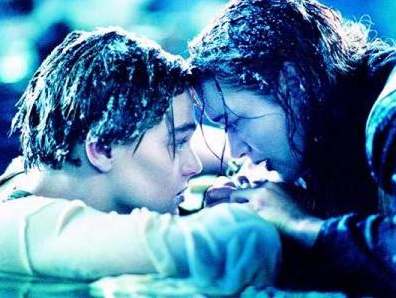
For my homework task I was instructed to find two images from films, one of them being a sad, emotional scene and one of them being a happy scene. I chose the top image from the film, Annie, this shot is of when Mr Warbucks and Annie are finally together and the sad image is from the film titanic, this is when they are telling each other they will never let go, it is a very emotional scene.
Subscribe to:
Posts (Atom)